Every tailor starts the same way.
A new client walks in. You write their name in a notebook, take their measurements, jot down what they want — a dress, a suit, a kaftan — and agree on a price. Maybe you collect a deposit.
Then business picks up. Five clients become fifteen. Fifteen become forty. Suddenly you have a team of three. Orders overlap. Deadlines blur. And that notebook? It's buried under fabric swatches on your cutting table.
So you move to spreadsheets. Google Sheets. Excel. Maybe a combination of both. It feels like a huge upgrade — and for a while, it works.
Until it doesn't.
This post is for tailors and fashion designers who've outgrown spreadsheets but aren't sure what comes next. We'll walk through exactly where spreadsheets break down, what it costs you when they do, and how purpose-built software like Tailara handles the same problems.
Spreadsheets work — until your business grows
Let's be fair. Spreadsheets are genuinely useful when you're starting out. They're free, flexible, and familiar. You can track clients, log orders, and even calculate balances with a few formulas.
But spreadsheets were designed for accountants working with numbers in rows and columns. They were never designed to run a tailoring business. And the gap between "good enough" and "actually built for this" becomes painfully obvious once you're juggling 30+ active clients, multiple staff, and dozens of orders at different stages.
Here's where it falls apart.
Problem 1: Measurements get lost or mixed up
This is the one that costs you the most — both money and reputation.
In a spreadsheet, measurements are just numbers in cells. There's no structure that says "this is a bust measurement for a Kaba & Slit" versus "this is a chest measurement for a men's suit." You might have a column called "Bust" but nothing stops someone from entering a hip measurement in that column.
Worse, if a client has been measured multiple times for different garments, those measurements are scattered across different rows or sheets. Finding the right one — quickly, while the client is waiting — is stressful.
What actually happens: A cutter uses the wrong measurement because they grabbed the row above. The fabric is cut. It doesn't fit. You eat the cost of the material, redo the work, and the client loses a little trust. Multiply that by a few times a year, and you're bleeding money.
How Tailara handles it: Each client has a dedicated profile with structured measurement sets. A measurement is always linked to a specific garment style (Kaba & Slit, Wedding Dress, Men's Suit). It records who took the measurement, when it was taken, and in what unit. You pull it up in five seconds on your phone. No searching, no confusion, no wrong measurements.
Problem 2: Order tracking becomes chaos
A typical tailor shop has orders in five or six different stages at any given time: some just placed, some in cutting, some being sewn, some ready for fitting, some awaiting delivery. In a spreadsheet, all of these are just rows.
You might color-code them. You might add a "Status" column. But there's no visual workflow, no automatic updates, and no way for your team to see at a glance what needs attention today.
What actually happens: A client calls to ask about their order. You open the spreadsheet, scroll through dozens of rows, try to find their name, then try to figure out which status label you used — was it "In Progress" or "Sewing" or "WIP"? Meanwhile the client is waiting on the phone.
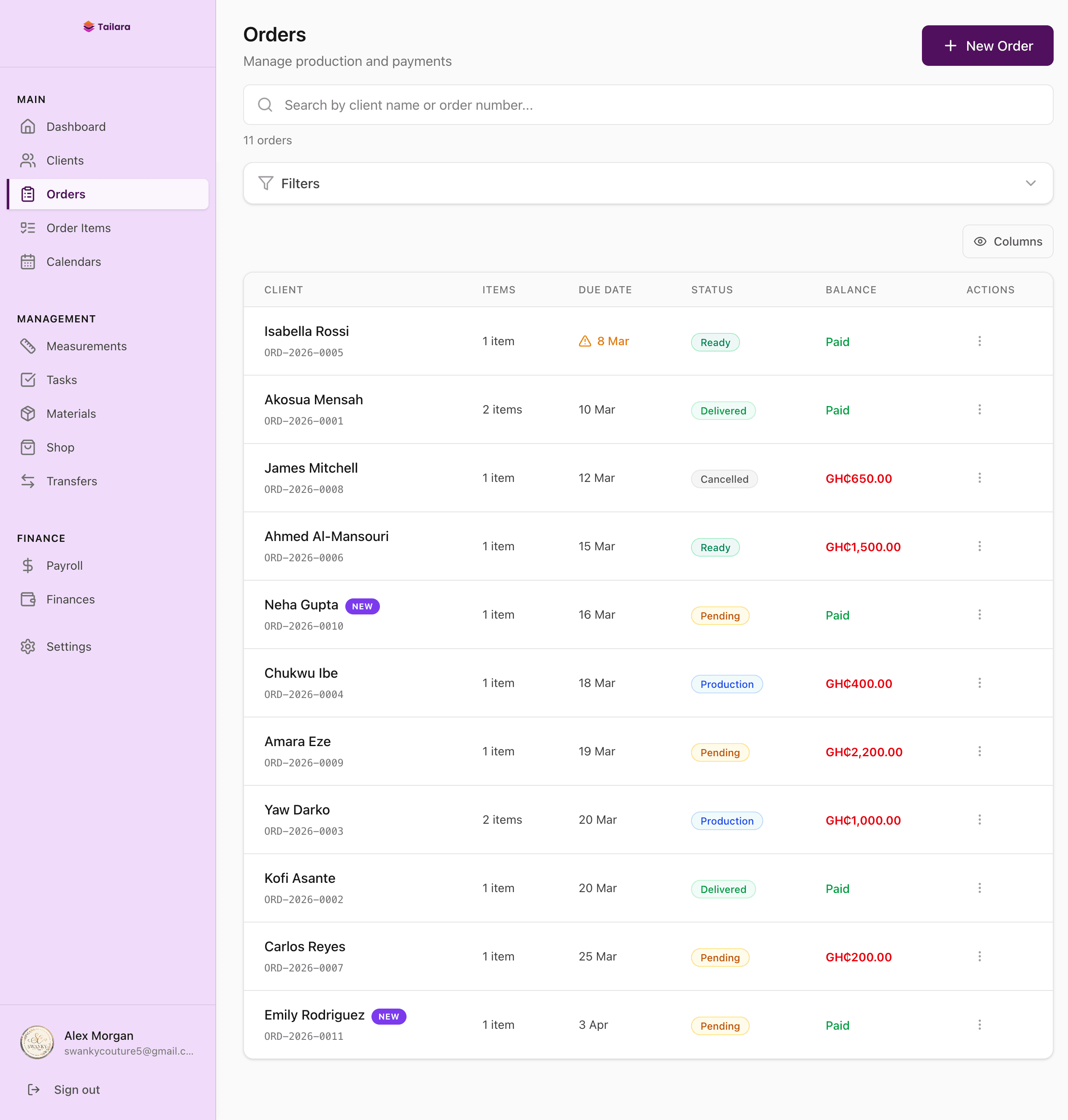
How Tailara handles it: Every order has a visual status — Pending, Production, Ready, Delivered, or Cancelled — that updates across the entire system. You can see every order at a glance, filter by status, search by client name, and open any order to see its full history: line items, fabric photos, style references, payments, and job costing. Your cutter, your sewer, and you are all looking at the same information.
Problem 3: Payment tracking is a nightmare
This is where spreadsheets cause the most friction between tailors and clients.
Most tailoring orders involve partial payments — a deposit when the order is placed, maybe a second payment at fitting, and the balance on delivery. Tracking this in a spreadsheet means updating cells manually, hoping the formula still works, and trusting that nobody accidentally edited the wrong row.
What actually happens: "Did she pay her balance?" You check the spreadsheet. The deposit is recorded, but there's nothing in the "Balance Paid" column. Did she pay and someone forgot to update it? Did she not pay? You check WhatsApp. You ask your assistant. Twenty minutes later, you're still not sure. Meanwhile, the client is at your shop expecting to pick up her dress.
How Tailara handles it: Every payment is recorded against a specific order with the amount, date, method (cash, mobile money, bank transfer), and who recorded it. The balance updates automatically. When you open an order, you instantly see: total cost, amount paid, and outstanding balance. No formulas. No guesswork. You can even send a branded invoice or receipt directly to the client.
Problem 4: Your team can't collaborate effectively
When it's just you, a spreadsheet is manageable. But the moment you add a cutter, a second tailor, or a shop assistant, everything gets complicated.
Who has edit access? What if two people edit the same row at the same time? How does your cutter know which orders to work on today without calling you? How do you assign tasks without a WhatsApp message that gets buried in a group chat?
What actually happens: You create a WhatsApp group for your team. Every morning, you type out what each person should work on. By noon, the messages are buried under photos, voice notes, and unrelated conversations. Your cutter misses an update. An order is late.
How Tailara handles it: Managers and assistants who need full app access get their own login with role-based permissions — they see only what their role allows. For your tailors, cutters, and beaders who don't need app access, you assign tasks directly in Tailara and send them a detailed task sheet via WhatsApp. The task sheet includes everything they need: task name, task due date, order due date, fabric photos, style reference images, the client's measurements, and the client's name. Everyone knows exactly what to do, without the noise of a group chat.
Problem 5: You can't see your real numbers
How much revenue did your shop generate last month? What's your most profitable garment type? How much are you spending on materials versus what you're charging? Which staff member completed the most tasks?
A spreadsheet can technically answer these questions — if you build the right formulas, pivot tables, and charts. But most tailors don't. The spreadsheet becomes a dumping ground for data, not a tool for insight.
How Tailara handles it: The dashboard shows your revenue trend, active orders, pending payments, and upcoming deadlines — all updated in real time. The financial reports break down revenue by source (orders vs. shop sales), expenses by category, and profit margins. Job costing shows the actual cost of materials and labor on each order, so you know your true profit — not just what the client paid.
The real cost of sticking with spreadsheets
It's easy to think spreadsheets are "free." But they're not. They cost you in ways that don't show up on a balance sheet.
Lost measurements mean redoing work. Even one botched order per month at $15-20 in wasted fabric adds up to over $200 per year.
Missed deadlines mean unhappy clients who don't come back — and don't refer their friends. One lost client who would have spent $400-500 per year is revenue you'll never see.
Payment confusion means either you forget to collect a balance (lost revenue) or you ask a client who already paid (lost trust). Neither is good for business.
Time spent searching for information is time you're not spending on the craft. If you spend 30 minutes a day looking things up in spreadsheets, that's over 180 hours per year — more than four full work weeks.
When should you switch?
Spreadsheets are fine if you're a solo tailor with fewer than 10 clients per month and no staff. There's no shame in starting simple.
But if any of these sound familiar, it's time to move on:
- You have more than 20 active clients
- You've hired at least one person (cutter, assistant, or second tailor)
- You've lost a measurement or missed a deadline in the past 3 months
- You're spending more than 15 minutes a day on admin instead of sewing
- Clients have asked about their order status and you had to "check and get back to them"
- You've had a payment dispute because records didn't match
Making the switch: what it actually looks like
Moving from spreadsheets to Tailara doesn't mean starting from scratch. You can import your existing clients and measurements from your spreadsheet directly into Tailara using the built-in import wizard. Upload your CSV or Excel file, map the columns, review the data, and import. Your history isn't lost — it's organized.
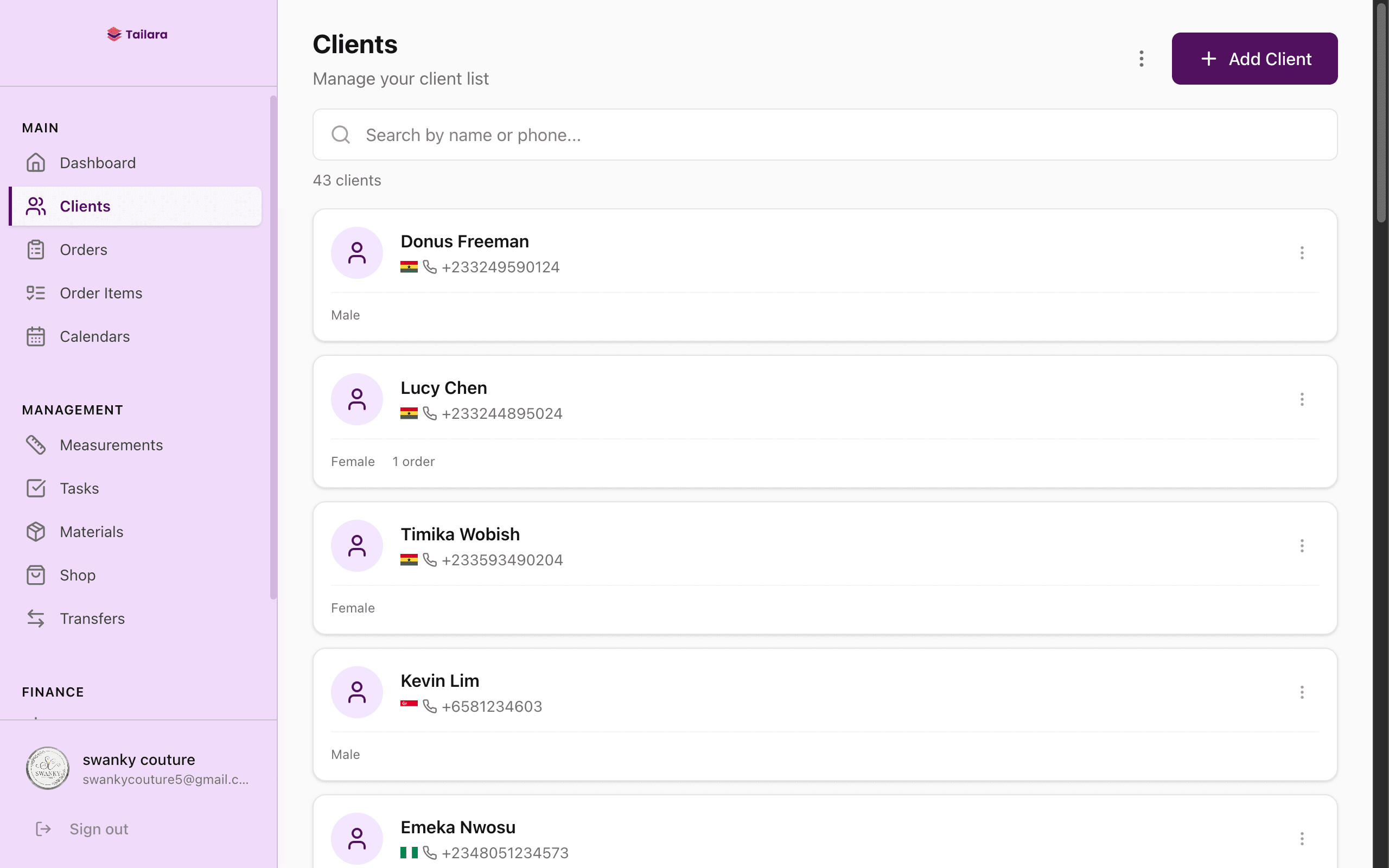
The first day feels different. Instead of opening a spreadsheet and scrolling, you open Tailara and see a dashboard: upcoming deadlines, recent orders, pending payments. You tap a client's name and see their full profile — measurements, orders, payments, notes.
Within a week, your team is using it. Within two weeks, you wonder how you managed without it.
Tailara vs. Spreadsheets: side by side
Client measurements — Spreadsheets store measurements as unstructured cells with no context. Tailara gives every client a structured profile with measurement sets linked to specific garment styles.
Order tracking — Spreadsheets require manual status updates that your team has to remember to make. Tailara shows a visual workflow — Pending, Production, Ready, Delivered — updated in real time.
Payment recording — Spreadsheets rely on formulas that break. Tailara calculates the outstanding balance automatically and logs every payment with the date, amount, and method.
Team collaboration — Spreadsheets shared via Google Drive create conflicts and confusion. Tailara uses role-based access so each person sees only what they need, and task sheets go directly to cutters and tailors.
Invoicing — Spreadsheets require you to manually create documents. Tailara generates branded invoices and receipts in one click.
Financial reports — Spreadsheets need custom pivot tables that most tailors never build. Tailara's dashboard shows revenue, expenses, and profit margins updated in real time.
Material tracking — Spreadsheets mean yet another file. Tailara has integrated inventory with photos and fabric variants.
Payroll — Spreadsheets mean yet another spreadsheet. Tailara has built-in payroll with commission tracking.
Access from phone — Spreadsheets are clunky on mobile. Tailara is designed mobile-first for Android and iOS.
Data safety — Spreadsheets are one accidental delete away from lost records. Tailara is cloud-backed with automatic backups.
Price — Spreadsheets are free. Tailara starts at GH₵79/month (~$6 USD).
Try it yourself
Tailara offers a 14-day free trial with full access to every feature. No credit card required. You can import your existing clients and start managing orders the same day.
If spreadsheets are working for you, keep using them. But if you've felt that familiar frustration — the lost measurement, the payment you can't verify, the deadline you almost missed — it might be time to try something built specifically for how you work.
Romain Cho is the founder of Tailara and has spent 8+ years studying the tailoring industry across multiple countries. His wife Elizabeth is a professional fashion designer whose challenges inspired the platform.